
A lead from your ad becomes a signed offer
Follow one buyer from a Meta lead ad to a reserved apartment. GetTwin does the replies, the paperwork, and the reminders. Your team does the selling.
An example with demo data
An example day
How one lead becomes a reservation
One buyer, eight steps, four people. Names, units, and figures are demo data.
Step 1: Buyer
A buyer fills out your lead ad
Clara taps your Meta lead ad for Lakeside Residences and sends her name and phone number. The lead lands in your lead pipeline with its source, not in an inbox.
Uses
Meta lead ad New lead
Clara O.
- Project
- Lakeside Residences
- Campaign
- Lakeside launch
- Language
- English
- Owner
- Alex Morgan
Added to your lead pipeline
Step 2:
GetTwinGetTwin replies and asks what she needs
GetTwin answers Clara, then asks about her budget and the number of bedrooms. Her answers go straight onto her card.
Uses
- GetTwin
Hi Clara, thanks for your interest in Lakeside Residences. How many bedrooms are you looking for, and what budget do you have in mind?
Clara O.
Two bedrooms, up to about $460k. I’d like to visit.
Saved to Clara’s card
- 2 bedrooms
- Up to $460k
- Wants to visit
Step 3: Salesperson
A hot lead lands on the salesperson’s phone
Clara’s answers make her a hot lead. Alex gets an alert in the GetTwin app with what she’s looking for, and calls her to book a visit.
Uses
- AI lead pipeline
- Mobile app for iOS and Android
Wednesday, November 18
9:41
GetTwinnow
Hot lead: Clara O.
2 bedrooms, up to $460k · Lakeside Residences. Wants to visit.
Step 4: Salesperson
Clara sees what’s still available, in 3D
At the sales office, Alex opens the 3D presentation. Clara sees which apartments are available and which are sold, floor by floor.
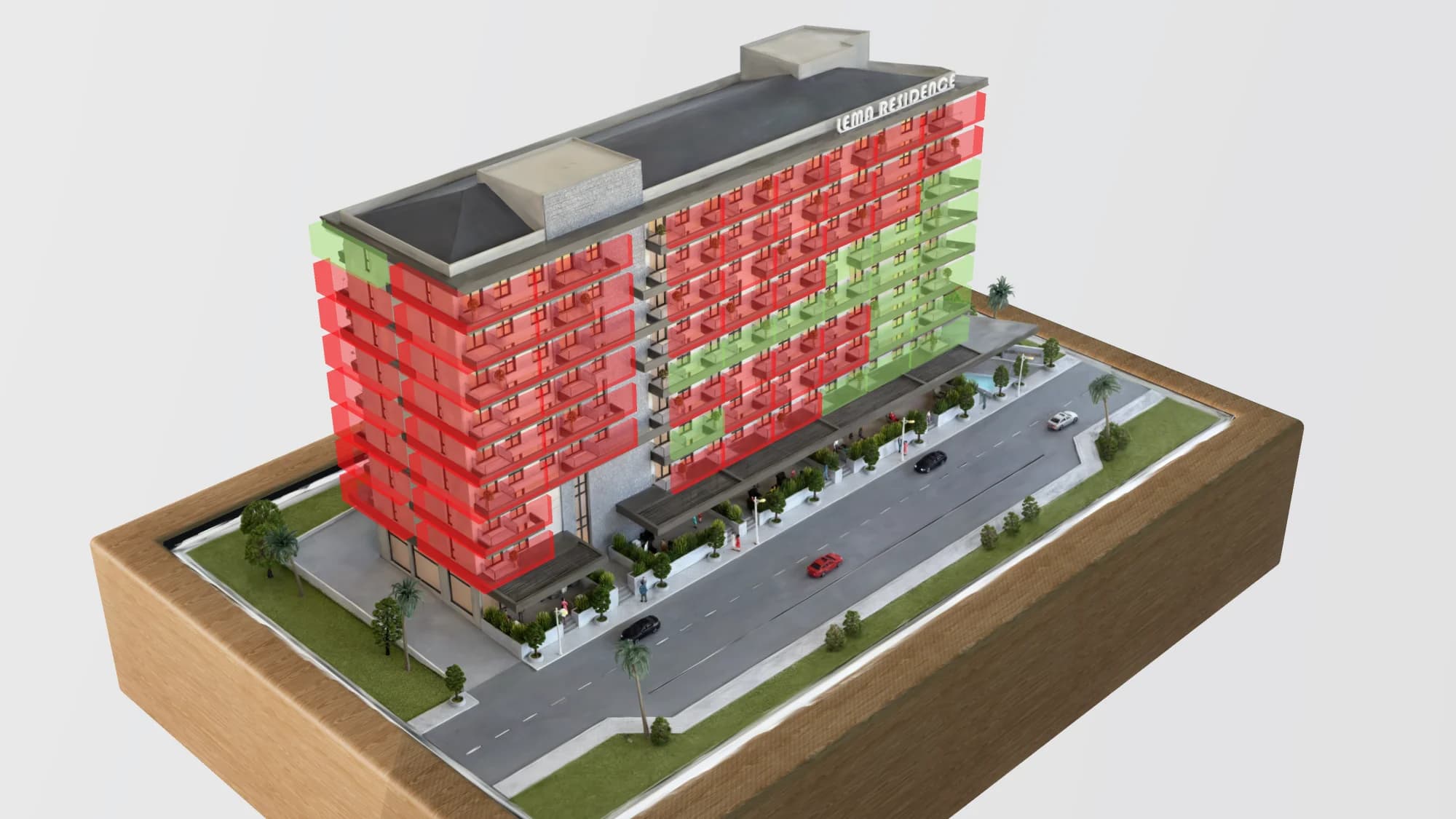
- Available
- Sold
- Available
- Sold
Shown with Lema Residence, İzmir, a real project in 3D with live availability Step 5: Salesperson
The offer, with the payment plan inside
Clara picks A-502. Alex chooses a payment plan template, and GetTwin builds the offer with the down payment and every installment.
Offer
A-502 · Clara O.
Payment plan template
25% down, 36 monthly installments
- List price
- $460,000
- Down payment, 25%
- $115,000
- 36 monthly installments
- $9,583
Schedule
- Down paymentOn signing$115,000
- Installment 1Month 1$9,583
- Installment 2Month 2$9,583
- Installment 3Month 3$9,583
+ 33 more installmentsSend to ClaraStep 6: Manager
“Can you do 3%?” The manager decides
Clara asks for a discount above Alex’s limit. The request goes to the sales manager, who approves it in the mobile app. The decision is recorded on the deal.
Wednesday, November 18
11:20
GetTwinnow
Approval needed
3% discount on A-502 for Clara O. Above Alex’s limit of 2%.
ApproveDecline
Step 7: Buyer
A page for Clara, with her offer
Clara gets a personal page with the apartment, its floor plan, and the payment plan. Alex sees when she opens it.
LLAKESIDE RESIDENCESEN · DE · TRYour offer, Clara
A-502
2 bedrooms · 96 m² · 5th floor
- Price after 3% discount
- $446,200
- Down payment, 25%
- $111,550
- 36 monthly installments
- $9,296
Accept the offerCall AlexPowered by GetTwin
Step 8: Buyer
“I’ll take it.” The apartment is reserved
Clara accepts the offer. A-502 turns reserved on the stacking plan for the whole team, and the down payment is scheduled in collections.
Tower A · Lakeside Residences
7701702703704705706660160260360460560655015025035045055064401402403404405406- Available
- Reserved
- Sold
Reserved DealClara O. · A-502
- Offer
- Accepted
- Down payment
- $111,550
- Owner
- Alex Morgan
Down payment scheduled in collections
What it takes
Five parts of GetTwin, one deal
This flow uses five parts of GetTwin. They share the same leads, units, and offers, so nobody types anything twice.
AI lead pipeline
Every lead and deal in one place. GetTwin replies, asks the right questions, and follows up.
See the AI lead pipelinePresentation and buyer pages
The 3D model, unit finder, and floor plans in the sales office, and a personal page for each buyer.
See presentation and buyer pagesStacking plan and live stock
Every unit by floor, with live availability. A reservation shows up for everyone.
See the stacking planOffers and payment plans
Offers with the down payment and every installment, from your own templates.
See offers and payment plansCollections and reports
The down payment and every installment scheduled, tracked, and chased.
See collections and reportsMobile app
Instant alerts for a new lead, a sale, an approval, or a report that’s ready. On every plan, for iOS and Android.
AI lead follow-up, approvals, buyer pages written by GetTwin, and collections are on Pro and Max. Compare plans
Questions about this flow
Do we need Meta lead ads for this?
No. Leads from your website forms, lead ads, and the ones your team or agencies add all land in the same lead pipeline, and the flow is the same from step 2.
Does GetTwin send offers and discounts on its own?
GetTwin acts, your team decides. It replies to leads and builds the offer, and a person sends it. Discounts above someone’s limit wait for the right approval, and every step is recorded.
What if the buyer comes through an agency?
The agency adds the buyer in the agency portal and sees only its own deals. The rest of the flow is the same, and the sale is credited to the agency. The agency portal is on Pro and Max. See the agency portal
See this flow on your project
We walk through it with your own units and payment plans, from the first lead to the reservation.
- We set it up with you
- We bring your existing data over
- Your team just sells